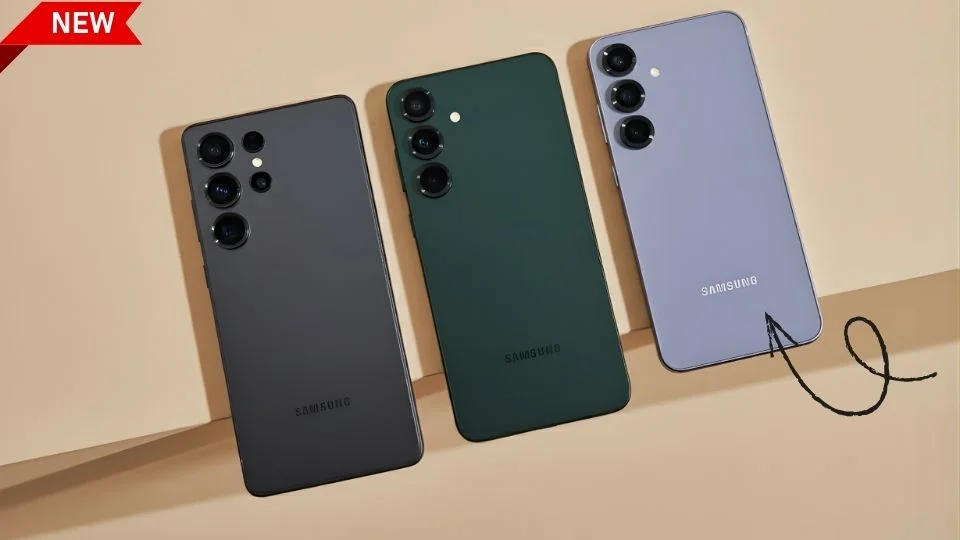
Why Thinness Still Matters For Everyday Use
The Samsung Galaxy S26 trims precious millimeters without sacrificing confidence in the hand, and that change is meaningful the moment you pick it up. A thinner perimeter lets fingers wrap more naturally, so swipes feel lighter and long reading sessions cause less palm fatigue. Pocketing improves too: the Samsung Galaxy S26 slides into denim coin-pockets and slim handbags with less edge drag, which sounds minor until you do it dozens of times a day. Thinness also shapes perception—sleek objects feel faster and more premium—yet the trick is achieving it without compromising rigidity, battery consistency, or thermal stability.
That’s where refined internal packaging comes in: layered graphite, compact vapor chambers, and a carefully positioned charging coil create a balanced stack that keeps the frame slim while managing heat under load. The result is a Samsung Galaxy S26 that feels featherlike but not fragile, trim but still reassuring when you tap, type, game, and shoot photos. In simple terms: less slab, more tool. When a design removes friction from the tiny moments—unlocking, scrolling, pocketing—you notice, and that’s exactly the promise of a thinner Samsung Galaxy S26.
| Quick Snapshot | Galaxy S26 | Galaxy S25 |
|---|---|---|
| Thickness | Thinner chassis for lighter hand-feel | Slightly thicker previous gen |
| Wireless Charging | Qi2 with built-in magnets | Qi2 support via accessories |
| Design | Streamlined frame, refined camera island | Classic separated lenses |
| Focus | Efficiency, ergonomics, magnetic ecosystem | Refinement over prior S series |
Qi2 Magnets On Board: Click-Perfect Charging Without Guesswork
The headline upgrade for the Samsung Galaxy S26 is the move to Qi2 with an internal magnetic ring, which brings snap-to-center alignment every time you drop the phone on a pad. Older chargers sometimes felt like “find the sweet spot”; with Qi2 magnets, the Samsung Galaxy S26 finds it for you. Precise alignment improves power transfer, curbs wasted heat, and keeps charging speeds steadier whether the phone is flat on a puck or upright on a stand.
It also unlocks a cleaner desk and car setup: magnetic mounts hold fast on potholes and speed bumps, while compact battery packs attach flush for on-the-go top-ups without cables. Because Qi2 aims at cross-brand compatibility, the Samsung Galaxy S26 steps into a broader ecosystem of stands, wallets, grips, tripods, and travel docks. For creators, that means overhead rigs that snap in securely; for commuters, a mount that simply clicks and stays put; for everyone, a nightstand routine that goes from “fiddle and hope” to “drop and done.” The Samsung Galaxy S26 treats wireless charging as a default habit, not a fallback option—and that shift is huge.
S25 vs S26: From ‘Qi2-Ready’ To ‘Qi2-Native’
Comparing generations clarifies the value. The S25 family supported Qi2 standards but leaned on accessories for magnetic alignment. The Samsung Galaxy S26 changes the baseline by baking magnets into the chassis, so alignment is automatic, consistent, and case-agnostic. In daily life, that means fewer failed charges when you reach over in the dark, steadier GPS sessions on a magnetic car mount, and cooler charging sessions because the coils line up properly.
Accessory designers can also slim down cases and battery packs because they no longer need to add their own magnet array to compensate. The Samsung Galaxy S26 evolves the user story from “you can get magnets if you want them” to “you have magnets, now enjoy them everywhere.” It’s a classic example of a small spec tweak re-writing the experience every hour of the day.
Design Language: Slim Frame, Tidy Camera Island, Confident Grip
The Samsung Galaxy S26 refines a minimalist aesthetic: clean edges, soft radii, and a camera island that consolidates the optics into a neat vertical pill. That island isn’t just styling; it works as a structural brace around dense components, reducing torsional flex while giving the magnetic ring and charging coil room to breathe. The back glass and metal frame meet with tighter tolerances, so lint doesn’t cling at the seams and swipes across the edge feel silkier.
Micro-chamfers at contact points help the Samsung Galaxy S26 sit flat without wobbling on a desk, even as the camera hardware steps up. It’s a restrained look designed for all-day handling: smooth, secure, and pocket-friendly. The guiding principle is intuitive—when you touch the Samsung Galaxy S26, nothing pokes, pinches, or snags.
Display Experience: Brighter, Smarter, Easier On The Eyes
A flagship earns its status at the screen. The Samsung Galaxy S26 targets a panel that marries high peak brightness with nuanced tone mapping so outdoor legibility is effortless and color accuracy holds under harsh sun. Adaptive refresh keeps scrolling liquid while preserving battery when static content is on screen.
Touch latency drops in gaming mode, reducing input lag so flicks and swipes feel more like instinct than action. Anti-reflective coatings and tuned PWM behavior aim to reduce eye strain during long reads. Paired with the slimmer frame, the panel feels closer—like holding the content itself. Whether you’re editing photos, watching HDR films, or running split-screen productivity, the Samsung Galaxy S26 display is tuned to feel crisp, calm, and consistent.
Performance & Efficiency: Cool Sustained Speed Over Peak Spikes
Modern chipsets are fast across the board; what separates a great phone is sustained performance. The Samsung Galaxy S26 focuses on holding frequencies without thermal throttling, especially when wirelessly charging on a Qi2 stand during a video call or navigation. Efficient cores handle background syncs while high-performance cores punch through exports and big games.
Storage speeds accelerate app installs and camera bursts, while memory management keeps social apps, docs, and maps hot in RAM. The thin body demands thoughtful heat paths; that’s where layered graphite and a re-shaped vapor chamber matter. The Samsung Galaxy S26 aims to feel fast at minute 40 the same way it feels fast at minute 4—quietly competent rather than explosively spiky.
Battery, Thermals, And Charging Behavior With Qi2
Charging alignment affects heat, and heat affects battery health. With magnets ensuring center-to-center coil contact, the Samsung Galaxy S26 reduces hot spots and evens out thermals, improving comfort and long-term capacity retention. Intelligent charging profiles adapt to your routine, topping slowly overnight or pushing harder before you leave for work.
On-desk charging becomes a subtle trickle that maintains level without cycling aggressively, and a magnetic battery pack can bridge a long commute or shoot day. Because the Samsung Galaxy S26 is thinner, thermal tuning is critical; the goal is to keep surface temperatures tame even when pushing data, maps, and camera simultaneously. The pay-off is a phone you trust on busy days: cool enough to hold, charged enough to finish.
Camera Hardware & Imaging Pipeline: Stable Mounts, Sharper Results
Photography benefits directly from magnets. The Samsung Galaxy S26 pairs stabilized optics and computational imaging with magnetic mounts that lock the phone into tripods, gimbals, and overhead arms instantly. That stability cuts blur in low light, improves hyperlapses, and makes desk-down recording far less fussy.
A tuned image pipeline aims for lifelike skin tones, cleaner shadows, and less color clipping in neon scenes. Faster buffer clearing shortens the time between night shots, while smarter HDR preserves highlight texture in white shirts and bright skies. The Samsung Galaxy S26 camera story is practical: mount fast, shoot steady, share quicker—then drop back on a Qi2 stand and keep going.
One UI Experience: Little Friction, Lots Of Flow
Software polish is where great hardware earns loyalty. On the Samsung Galaxy S26, quick settings toggle layout is reachable with one thumb, haptic cues are quieter but more precise, and continuity features make it trivial to move a call from phone to tablet to watch. Routine tasks—scanning a document, extracting text, cleaning a clip—hide behind one-tap actions instead of four. The launcher and widgets respect the thinner hardware by using more breathable spacing, and power user features like DeX, secure folders, and multi-window coexist without clutter. The Samsung Galaxy S26 doesn’t shout; it simply removes steps.
Accessories & Ecosystem: The Magnetic Multiverse
Because Qi2 is an open standard, the Samsung Galaxy S26 can tap into a wider field of magnetic accessories—desk pucks, floating stands, ring grips, wallets, car mounts, and travel banks. Creators can assemble a portable studio with a magnetic tripod, LED panel, and battery all snapping together in seconds. Office workers can park the Samsung Galaxy S26 vertically next to a laptop for second-screen notifications. Travelers can bring one wafer-thin charger that does nightstand duty and doubles as a kickstand on planes. As adoption grows, expect slimmer, cheaper, more imaginative add-ons that treat the Samsung Galaxy S26 like a hub, not just a handset.
Durability & Repairability: Thin Doesn’t Mean Delicate
A slimmer profile doesn’t have to compromise confidence. Strategic ribbing around the camera island, a stiffer mid-plate, and carefully placed adhesives help the Samsung Galaxy S26 resist torsion and daily knocks. Ingress protection remains table-stakes for the series, while improved gasket design targets longevity across charge cycles and temperature swings. For serviceability, standardized screws and modular sub-assemblies can make common repairs more straightforward. The aim is simple: the Samsung Galaxy S26 should feel premium on day one and still feel tight, aligned, and squeak-free years later.
Workflows & Productivity: Desk-Friendly By Design
Magnetic stands transform the Samsung Galaxy S26 into a miniature dashboard. Dock the phone in portrait for chats and calendars, or rotate to landscape for second-screen timers and notes while you present. Voice recording with automatic transcripts, text extraction from whiteboards, and drag-to-share between apps reduce busywork. For field teams, a magnetic battery keeps scanning and GPS alive through long shifts. When a device becomes easy to place and power everywhere, you start using it more ambitiously—and that’s the quiet advantage of the Samsung Galaxy S26.
Gaming & Entertainment: Cooler, Louder, Crisper
The Samsung Galaxy S26 blends a responsive display with tuned speakers and haptics for a richer media feel. Game Mode optimizes touch response, background tasks, and network routing, while thermal pacing keeps frame rates smoother over time. Snap the phone to a magnetic stand, pair a controller, and you’ve got a living-room-lite setup in seconds—no cables snaking across the desk. For movies, HDR tone mapping preserves shadow texture without crushing blacks, and dialog clarity stays high at moderate volumes. The Samsung Galaxy S26 aims for the sweet spot: performance you can hold comfortably.
Privacy & Security: Trust Built-In
Security is part of premium. The Samsung Galaxy S26 continues the series focus on secure enclaves, granular permission prompts, and transparent background activity indicators. Private Share, secure folders, and on-device processing for sensitive tasks mean more data stays local. Biometric unlock balances speed and spoof resistance, and remote-find tools help recover or wipe a misplaced phone. The Samsung Galaxy S26 keeps your everyday faster while keeping your information tighter.
Who Should Upgrade To The Galaxy S26?
If you value wireless convenience, a cleaner desk, and a lighter pocket feel, the Samsung Galaxy S26 is a strong step up. Nightstand chargers, car mounts, and creator rigs all become simpler with magnets built in. If you hold onto phones for several years, improved thermals and alignment-friendly charging can pay dividends in battery health. Power users chasing sustained speed, frequent travelers who rely on streamlined packing, and creators who mount their phones often will feel the difference most. If you’re satisfied with cabled charging and rarely use stands or mounts, the S25 may remain “good enough,” but the Galaxy S26 is the better everyday companion.
Buying Checklist (Fast, Practical, Helpful)
Charging style: Do you prefer wireless stands at desk/bedside?
Mounting needs: Drive often, record overhead, or stream hands-free?
Comfort: Sensitive to weight or edge pressure during long use?
Thermals: Play long gaming sessions or video call while charging?
Longevity: Want smarter charging behavior for better battery health?
Pros & Cons Snapshot
Pros (Samsung Galaxy S26): Thinner, lighter hand-feel; Qi2 magnets for reliable alignment; cleaner accessory ecosystem; improved thermal consistency; tidy camera island.
Cons: Thinner frames can feel sharper to some grips; magnetic accessories add-on costs; habits may shift if you’re used to cables.
Conclusion
The Samsung Galaxy S26 brings two upgrades that matter every hour of the day: a slimmer build and Qi2 magnets built in. Together they turn small frictions into smooth motions—pocketing, placing, charging, mounting. Add a refined display, tuned thermals, and a calmer design, and you get a flagship that feels premium not just in benchmarks but in the hundreds of micro-moments that define phone life. If you want a device that’s easier to live with, kinder to battery health, and ready for a magnetic accessory wave, the Samsung Galaxy S26 is the sleek, sensible move.
FAQs
Q1. Does the Galaxy S26 need a special case for magnetic charging?
No. The Samsung Galaxy S26 integrates a Qi2 magnetic ring, so alignment works natively on compatible pads and stands.
Q2. Will older Qi pads charge the Galaxy S26?
Yes. The Samsung Galaxy S26 remains compatible with standard Qi pads; Qi2 simply adds magnetic alignment and efficiency gains on supported gear.
Q3. Does a thinner frame reduce durability?
The Samsung Galaxy S26 uses smart internal bracing and improved materials to keep flex and creaks at bay while maintaining a slim profile.
Q4. What everyday benefits do Qi2 magnets provide?
The Samsung Galaxy S26 aligns instantly for fewer missed charges, steadier car mounting, cooler charging, and easier creator setups.
Q5. Is wireless charging now as reliable as cable charging?
Cables remain fastest for peak top-ups, but Qi2 magnets make the Samsung Galaxy S26’s wireless experience consistent enough to use by default.

Comments (0)
Leave a Comment
No comments yet. Be the first to comment!