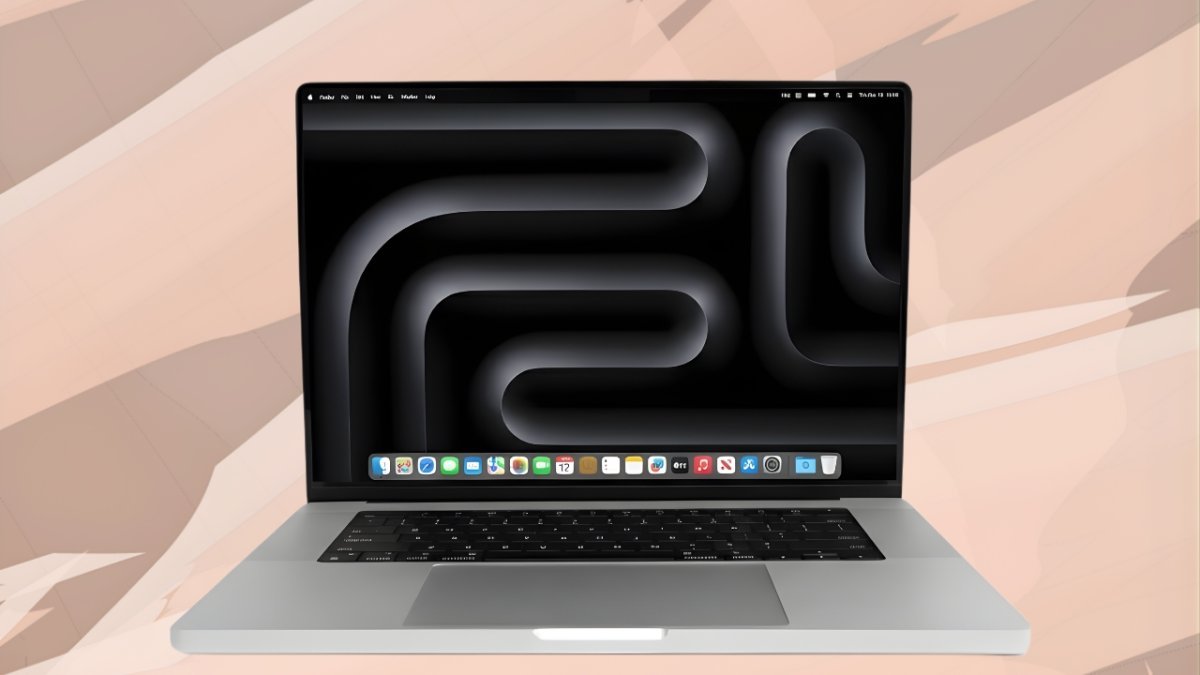
The Apple M4 Pro 16 with M4 Pro chip in Silver is Apple’s big, no-nonsense laptop for people who push their machines hard every single day—video editors, 3D artists, developers, music producers and power users running multiple heavy apps at once.
This configuration combines a Apple M4 Pro 16 16.2-inch Liquid Retina XDR display, the new Apple M4 Pro chip with a 14-core CPU and 20-core GPU, 24GB unified memory, 512GB SSD storage, and a 100Wh battery that can comfortably handle a full day of intensive work on a single charge. All of that comes wrapped in a premium silver aluminium body with plenty of ports, excellent speakers and the latest macOS features, including Apple M4 Pro 16 Intelligence.
If you’re wondering whether this specific model—the M4 Pro 16-inch in Silver—is worth the investment, let’s break it down.
Design & Build: Classic Silver, Big and Premium
Apple hasn’t messed with a design that already works. The 16-inch MacBook Pro still offers:
A solid unibody aluminium chassis in classic Silver
Clean, squared-off edges with a sturdy, confidence-inspiring hinge
A footprint and weight that clearly say “desktop-class power in a portable body”
The 16-inch model is around 1.68 cm thick, about 35.6 cm wide and 24.8 cm deep, weighing roughly 2.1 kg. It’s not an ultra-light travel laptop, but it feels incredibly rigid and durable—built for years of heavy use, travel and studio work.
The silver finish is the timeless MacBook look: professional, understated and less prone to showing fingerprints compared to darker finishes. In an office, studio or client meeting, it looks clean and premium without drawing too much attention.
Display: 16.2-inch Liquid Retina XDR for Serious Visual Work
The display is one of the main reasons to choose the 16-inch version. Apple M4 Pro 16 16.2-inch Liquid Retina XDR display features:
3456 × 2234 resolution at 254 ppi
Mini-LED backlighting with full XDR (Extreme Dynamic Range)
Up to 1,000 nits sustained full-screen brightness and 1,600 nits peak brightness for HDR content
Up to around 1,000 nits for SDR content outdoors
Support for P3 wide colour, True Tone and 1 billion colours
ProMotion variable refresh rate up to 120Hz
In everyday use this translates to:
Stunning HDR playback and grading, with deep blacks and brilliant highlights
Excellent visibility outdoors and in bright environments
Smooth motion when scrolling, animating, scrubbing timelines or gaming thanks to ProMotion
Trustworthy colour reproduction for photographers, designers and colourists once properly calibrated
For anyone serious about visuals—whether that’s photo editing, design, video or 3D—the screen alone is a huge reason to consider this machine.
Performance: Apple M4 Pro 16 with 14-Core CPU & 20-Core GPU
At the heart of this configuration is the Apple M4 Pro 16 chip, which includes:
A 14-core CPU (with a mix of performance and efficiency cores)
A 20-core GPU with hardware-accelerated ray tracing
A 16-core Neural Engine for AI and machine learning tasks
High memory bandwidth to keep everything fed and responsive
In this Silver base configuration you typically get 24GB of unified memory and a 512GB SSD.
Everyday Performance
For Apple M4 Pro 16 general tasks—web browsing, office work, video calls, streaming, light photo edits—the M4 Pro is more than overqualified. Apps launch instantly, mission control is fluid, and you can keep a lot of apps and browser tabs open without seeing the system slow down.
Professional Workloads
Where it really shines is in Apple M4 Pro 16 workflows:
Video Editing: 4K and even 8K timelines in Final Cut Pro, DaVinci Resolve or Premiere Pro feel surprisingly smooth, especially with formats like ProRes. Hardware-accelerated codecs help keep playback real-time and exports fast.
3D, VFX & Motion Graphics: The Apple M4 Pro 16 20-core GPU and hardware ray tracing support allow substantially faster previews and renders in supported apps, making it suitable for complex 3D scenes and motion design.
Development & Engineering: Large codebases, multiple containers, local servers and emulators all benefit from the extra CPU cores and fast storage.
AI & ML Workloads: The Neural Engine and GPU acceleration work together to speed up AI-powered features in macOS and creative apps.
For many professionals, the Apple M4 Pro 16 provides more than enough headroom for demanding projects, especially when paired with 24GB RAM.
Apple Intelligence & macOS
This MacBook Pro runs the latest macOS with Apple Intelligence integrated into the system. You get:
Writing tools to rewrite, summarise and adjust tone across apps
Smarter search, suggestions and organisation of your content
AI-assisted features that run primarily on-device, with a focus on privacy
Paired with the Apple M4 Pro 16 Neural Engine, these features make macOS feel more helpful for everyday productivity, communication and creative work, without feeling like a separate “AI program” bolted on top.
Memory & Storage: 24GB Unified, 512GB SSD
The base Apple M4 Pro 16 configuration offers:
24GB unified memory
512GB SSD storage
24GB RAM is a sweet spot for serious users:
Enough for heavy multitasking across browsers, editing apps, communication tools and virtual machines
Comfortable for 4K video editing, large Lightroom catalogs, and complex Figma or Photoshop projects
Suitable for developers running multiple IDEs, containers and databases
The 512GB SSD is very fast, but may feel tight if you work with a lot of 4K video or large project assets. You can:
Upgrade to 1TB, 2TB or more at the time of purchase
Use fast external NVMe SSDs over Thunderbolt for project files and archives
Just remember: both unified memory and internal SSD are not upgradeable later, so choose your configuration carefully up front.
Battery Life & Charging
The 16-inch Apple M4 Pro 16 houses a 100Wh battery, the largest you’ll typically find in a laptop while still staying within airline limits. Apple rates it for roughly:
Up to 24 hours of video playback
Up to 17 hours of wireless web browsing
Real-world results will vary depending on brightness and workload, but for mixed tasks—coding, editing, music playback, multiple apps, some heavier work—you can generally expect a full workday on battery without needing a charger.
Charging is handled by a 140W USB-C power adapter and a MagSafe 3 cable, supporting fast charging so you can go from low battery to a healthy level in around 30 minutes under good conditions. For a machine with a big display and this much power, battery life is one of its standout strengths.
Ports & Connectivity
One of the best aspects of the modern MacBook Pro line is the return of real ports. The Apple M4 Pro 16 16-inch gives you:
Three Thunderbolt (USB-C) ports with high-bandwidth support
HDMI port for external displays and projectors
SDXC card slot for quick SD card ingestion
3.5mm headphone jack
MagSafe 3 power connector
For wireless, you get:
Wi-Fi 6E for fast, stable wireless networking
Bluetooth 5.3 for headphones, keyboards, mice and other accessories
In terms of external displays, the Apple M4 Pro 16 16-inch can drive multiple high-resolution monitors, including 6K and even 8K configurations, making it a strong candidate for a full studio or desk setup.
Keyboard, Trackpad, Camera & Audio
The backlit Magic Keyboard delivers:
Comfortable key travel and a stable, precise feel
Full-height function keys along the top row
Touch ID for quick unlocking, password autofill and secure purchases
The Force Touch trackpad is large, precise and extremely smooth, with excellent support for macOS gestures—still one of the best trackpads available on any laptop.
Above the display sits a high-quality 1080p FaceTime camera backed by Apple’s image processing, providing clear video for calls and meetings.
The six-speaker sound system with force-cancelling woofers provides surprisingly rich, loud sound with good bass for a laptop. It supports Spatial Audio and Dolby Atmos, making it great for watching movies, checking mixes or just listening to music. A studio-quality three-mic array captures clear voice audio for calls, podcasts and screen recordings.
Who Should Buy the Apple M4 Pro 16-inch (Silver)?
The 16-inch Apple M4 Pro 16 MacBook Pro in Silver is ideal if you:
Work in video editing, VFX, 3D, motion graphics or photography, and need a top-tier display plus serious CPU/GPU power
Are a developer working with large projects, multiple virtual machines, Docker containers and heavy tooling
Want a desktop-class workstation that you can still carry between home, office and studio
Prefer a larger screen for timelines, code editors, spreadsheets and design work
Need strong battery life but don’t want to sacrifice performance
It may be overkill, or not the right fit, if you:
Mostly do browsing, office work, light editing and streaming—a MacBook Air or 14-inch Pro may be better value
Travel constantly and prioritise weight and size over power and screen size
Are on a tight budget and won’t fully use the performance headroom this machine offers
Verdict
The Apple M4 Pro 16 16-inch MacBook Pro (Silver) is a serious machine built for serious work. It blends:
A gorgeous 16.2-inch Liquid Retina XDR display
The powerful M4 Pro chip with a 14-core CPU and 20-core GPU
24GB unified memory in the base config, with lightning-fast SSD storage
Excellent battery life from a 100Wh pack
A generous set of ports and top-tier keyboard, trackpad, camera and speakers
The latest macOS experience with Apple Intelligence baked in
The downsides are predictable: a high price, a larger and heavier chassis than smaller MacBooks, and the fact that memory and storage can’t be upgraded later.
But if you choose the right configuration and actually push your laptop with real creative or technical work, the M4 Pro 16-inch MacBook Pro in Silver is one of the most capable and future-proof professional laptops available. For many creators and professionals, it can comfortably replace a desktop while still being portable enough to take on the road.
Disclaimer:
All the information, specifications, features and opinions mentioned in this article about the Apple M4 Pro 16 MacBook Pro (Silver) are based on publicly available details and our understanding at the time of writing. Actual features, configurations, prices and performance may vary by region, retailer or future software updates. Readers are advised to verify the latest specifications, availability and offers from official sources or authorised sellers before making any purchase decision. This article Apple M4 Pro 16 is for informational and educational purposes only and does not constitute financial, technical or purchase advice.

Comments (0)
Leave a Comment
No comments yet. Be the first to comment!