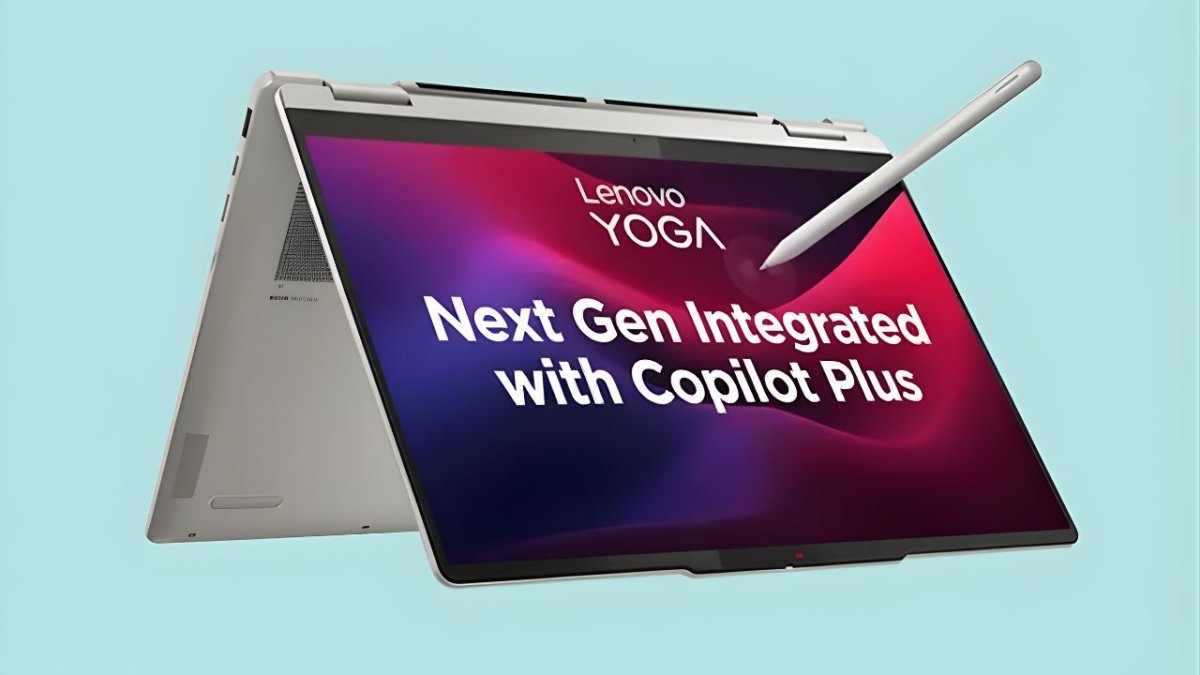
The Lenovo Yoga 7 2-in-1 Gen 10 (14") is one of those laptops that tries to do almost everything at once. It’s a 14-inch convertible with a 360-degree hinge, Intel Core Ultra processors with built-in AI acceleration, bright OLED display options, long-lasting 71Wh battery and a slim aluminium body that still fits plenty of ports.
Lenovo is marketing this generation as a true AI PC and everyday creator machine: something you can use as a normal laptop, flip into a tablet for drawing, or prop up in tent mode for Netflix. In this article we’ll walk from Lenovo Yoga 7 intro to verdict — design, display, performance, AI features, battery life, who it’s for, and what you should watch out for before buying.
Design and Build: Slim, Solid and Truly Convertible
The Lenovo Yoga 7 2-in-1 Gen 10 sticks to the premium Yoga language:
Aluminium chassis on both top and bottom, with an anodised, sandblasted finish.
Available colours like Storm Grey and Tidal Teal, giving it either a professional or more playful look depending on what you pick.
At about 317.7 × 222.1 × 16.6 mm and starting from roughly 1.49 kg for OLED models (around 1.61 kg for IPS variants), it’s compact enough to carry daily while still feeling substantial and rigid.
The 360° hinge is smooth and stable, letting you swap between:
Laptop mode for typing and work
Tent or stand mode for movies and presentations
Tablet mode for pen input and sketching
Build quality is a clear highlight. There’s very little flex in the keyboard deck or lid, and the metal chassis helps the Yoga 7 feel more “pro” than many plastic convertibles in the same price band.
Display: IPS, OLED or 2.8K OLED – You Choose
Lenovo Yoga 7 gives the Yoga 7 2-in-1 Gen 10 several 14-inch 16:10 touch display options:
Lenovo Yoga 7 14" WUXGA (1920 × 1200) IPS, 300 nits, 60Hz
Lenovo Yoga 7 14" WUXGA (1920 × 1200) OLED, 400 nits, 60Hz, 100% DCI-P3
Lenovo Yoga 7 14" 2.8K WQXGA+ (2880 × 1800) OLED, 400 nits, up to 120Hz, 100% DCI-P3
All panels are multi-touch, glossy with anti-fingerprint coating, and support 10-point touch. Screen-to-body ratio is around 91%, so bezels are slim and the laptop feels quite modern.
In simple terms:
The Lenovo Yoga 7 IPS WUXGA option is the most battery-friendly and still sharp enough for day-to-day work and streaming.
The Lenovo Yoga 7 WUXGA OLED gives you deep blacks, punchy colours and HDR support, ideal for movies and colour-rich content.
The Lenovo Yoga 7 2.8K OLED 120Hz variant is the premium choice for creators: sharper text, smooth scrolling, accurate colours and better detail when editing photos or 4K video.
All OLED models support Dolby Vision, DisplayHDR True Black 500 and TÜV Low Blue Light hardware protection, so they not only look great but are easier on the eyes during long sessions.
Performance and AI: Lenovo Yoga 7 Intel Core Ultra at the Centre
Under the hood, the Lenovo Yoga 7 2-in-1 Gen 10 uses Intel Core Ultra U and H-series processors from the Series 1 family, including options like Core Ultra 5 125H / 125U and Core Ultra 7 155H / 155U. These chips combine performance cores, efficiency cores and low-power “LPE” cores for better battery management.
Key performance details:
Up to Lenovo Yoga 7 16 cores / 22 threads on the Core Ultra 7 155H.
Integrated Lenovo Yoga 7 Intel Arc graphics on many configurations, giving a noticeable boost over older integrated solutions for light gaming and GPU-accelerated creative work.
Lenovo Yoga 7 LPDDR5X-7467 MHz memory, soldered, in either 16GB or 32GB dual-channel configurations.
M.2 2242 PCIe 4.0 NVMe SSD up to 1TB.
For everyday use — dozens of browser tabs, Office, video calls, streaming — the machine feels very responsive. The combination of high-speed RAM, PCIe 4.0 SSD and modern Intel platform makes windows and apps open quickly and keeps multitasking smooth.
AI PC and NPU
BecauseLenovo Yoga 7 built on Intel’s new AI architecture, the Yoga 7 2-in-1 Gen 10 qualifies as an AI PC. It has a dedicated NPU branded as Intel AI Boost with up to 11 TOPS of AI compute.
In practice, this means:
On-device acceleration for certain Lenovo Yoga 7 AI tasks (background blur, noise reduction, image enhancement) in compatible apps.
Better efficiency Lenovo Yoga 7 for Windows 11’s Copilot and other AI features when they run on the NPU instead of hogging CPU or GPU resources.
A dedicated Copilot key on the keyboard in many configs, so you can trigger Microsoft’s assistant quickly.
You Lenovo Yoga 7 won’t “see” the NPU directly, but it helps the laptop feel more modern and ready for upcoming AI-heavy workflows over the next few years.
Keyboard, Touchpad and Pen Experience
Lenovo Yoga 7 keeps things practical here:
Lenovo Yoga 7 6-row keyboard with multimedia Fn keys, 1.3mm key travel and white backlight.
Keyboard layout is familiar, and key feedback is soft but precise — good for long typing sessions, essays or coding.
The touchpad is a buttonless glass-like Mylar surface (approx. 75 × 120 mm) with Microsoft Precision drivers, so multi-touch gestures in Windows 11 feel natural and accurate.
For pen input, the Lenovo Yoga 7 2-in-1 Gen 10 supports Lenovo Yoga 7 options with 4096 levels of pressure. Some bundles include the pen, while others require you to purchase it separately. In tablet mode, the combination of OLED display and active pen is excellent for:
Annotating PDFs, taking handwritten notes in OneNote
Sketching, concept art, and marking up UI designs
Classroom diagrams or online whiteboarding
If you’re a student or creative who likes to write or draw directly on the screen, this is one of the main reasons to choose the Yoga form factor over a standard clamshell laptop.
Ports and Connectivity: Modern but Not Dongle-Heavy
Unlike some ultra-minimal laptops, the Lenovo Yoga 7 2-in-1 Gen 10 still gives you a useful set of physical ports:
1 × USB-A 3.2 Gen 1 (5 Gbps) with Always-On charging
2 × USB-C / Thunderbolt 4 / USB4 40Gbps with Power Delivery and DisplayPort 2.1
1 × HDMI 2.1 (up to 4K at 60Hz)
1 × 3.5mm headphone / mic combo jack
1 × microSD card reader
Wireless specs Lenovo Yoga 7 include Wi-Fi 6E (2×2) and Bluetooth 5.3, which is more than enough for fast home and office networks and modern peripherals.
For most users, that means you can:
Plug in an external 4K monitor via HDMI or USB-C
Use traditional USB-A accessories (mouse, older drives) without an adapter
Offload photos quickly using the built-in microSD reader
If you still need multiple full-size ports and Ethernet, a Thunderbolt dock will take you the rest of the way.
Battery, Charging and Thermals
Inside, Lenovo Yoga 7 fits a 71Wh Li-ion battery and a 65W USB-C power adapter with Power Delivery and Rapid Charge Express.
Lenovo’s lab tests (MobileMark and local video playback) report up to:
Around 14.5 hours on WUXGA IPS models (light use at modest brightness)
Around 12.5 hours on WUXGA OLED
Around 11 hours on 2.8K OLED
Real-world usage Lenovo Yoga 7 will be lower, especially if you keep brightness high, stay on Wi-Fi all day, or run heavy apps. But for typical office work plus some media and browsing, getting through a full workday on one charge is realistic, particularly on the lower-resolution panels.
Rapid Charge Express is handy when you’re in a rush — Lenovo claims you can get around 3 hours of runtime from a 15-minute top-up with the device in sleep or shutdown.
Thermally, the Core Ultra platform is designed to balance performance and heat. You’ll hear the fans spin up under sustained loads (video export, gaming, long compilation), but for normal workloads it stays relatively quiet and cool on the lap.
Audio, Camera and Security
For media and calls, the Lenovo Yoga 7 2-in-1 Gen 10 includes:
Stereo speakers, 2W × 2 with Dolby Atmos and smart amplifier, giving a fuller soundstage than many thin-and-light laptops.
Dual-microphone array for clearer voice capture on meetings and classes.
The webcam is a 1080p FHD + IR camera with a physical privacy shutter. It supports Windows Hello facial recognition, so you can log in just by sitting in front of the laptop.
On the security side you also get:
Firmware TPM 2.0
Optional fingerprint reader on the palm rest
A set of BIOS security features like self-healing BIOS and multiple password layers
For hybrid work and online classes, this combination of camera, audio and security is one of the strong points of the Yoga line.
Everyday Experience: Who Is It Really For?
The Lenovo Yoga 7 2-in-1 Gen 10 makes the most sense if you:
Want a single machine for work, study and entertainment that can flip into a tablet when needed.
Care about display quality — especially if you choose one of the OLED options.
Plan to use pen input for note-taking, sketching, annotation or creative work.
Like the idea Lenovo Yoga 7 of an AI-ready laptop with Intel Core Ultra and an NPU for future-focused features.
It’s less ideal if you:
Prefer a traditional non-touch clamshell and never use tablet mode.
Need a dedicated high-wattage GPU for serious AAA gaming or heavy 3D rendering.
Want fully upgradable RAM Lenovo Yoga 7 — here, the memory is soldered and not user-replaceable.
For students, content creators, and professionals who want a premium 14-inch convertible with good battery life and strong everyday performance, the Yoga 7 2-in-1 Gen 10 hits a very attractive balance.
Verdict: A Well-Rounded AI Convertible With Few Real Weaknesses
From intro to verdict, the Lenovo Yoga 7 2-in-1 Gen 10 stands out as a versatile, modern AI laptop that doesn’t forget the basics:
Solid Lenovo Yoga 7 aluminium build and refined Yoga design
Excellent display choices, especially the 2.8K OLED 120Hz option
Capable Intel Core Ultra performance with Intel Arc graphics and AI NPU
Comfortable keyboard, large touchpad and digital pen support
Useful Lenovo Yoga 7 port selection including USB-A, HDMI 2.1 and microSD
Respectable battery life with fast USB-C charging
Yes, the soldered RAM, lack of high-end dedicated GPU options and glossy screens will put off some niche users. But for most people who want a stylish 2-in-1 that can handle work, study, creativity and media in one device, the Yoga 7 2-in-1 Gen 10 is a very strong contender to put on your short list.
Disclaimer:
All Lenovo Yoga 7specifications, features, performance details and opinions mentioned in this article about the Lenovo Yoga 7 2-in-1 Gen 10 are based on information available at the time of writing. Actual configurations, prices, battery life and performance may vary depending on region, retailer, software updates and chosen variant (IPS/OLED, RAM, SSD, CPU). Readers are strongly advised to verify the latest specs, offers and availability directly from Lenovo or authorised sellers before making any purchase decision. This article is for informational and educational purposes only and does not constitute technical, financial or purchase advice.


Comments (0)
Leave a Comment
No comments yet. Be the first to comment!